One Inventory. Multiple Computers. Connected Operations.
RS Inventory – LAN is designed for businesses that want to manage inventory and retail billing across multiple computers connected through a local network.
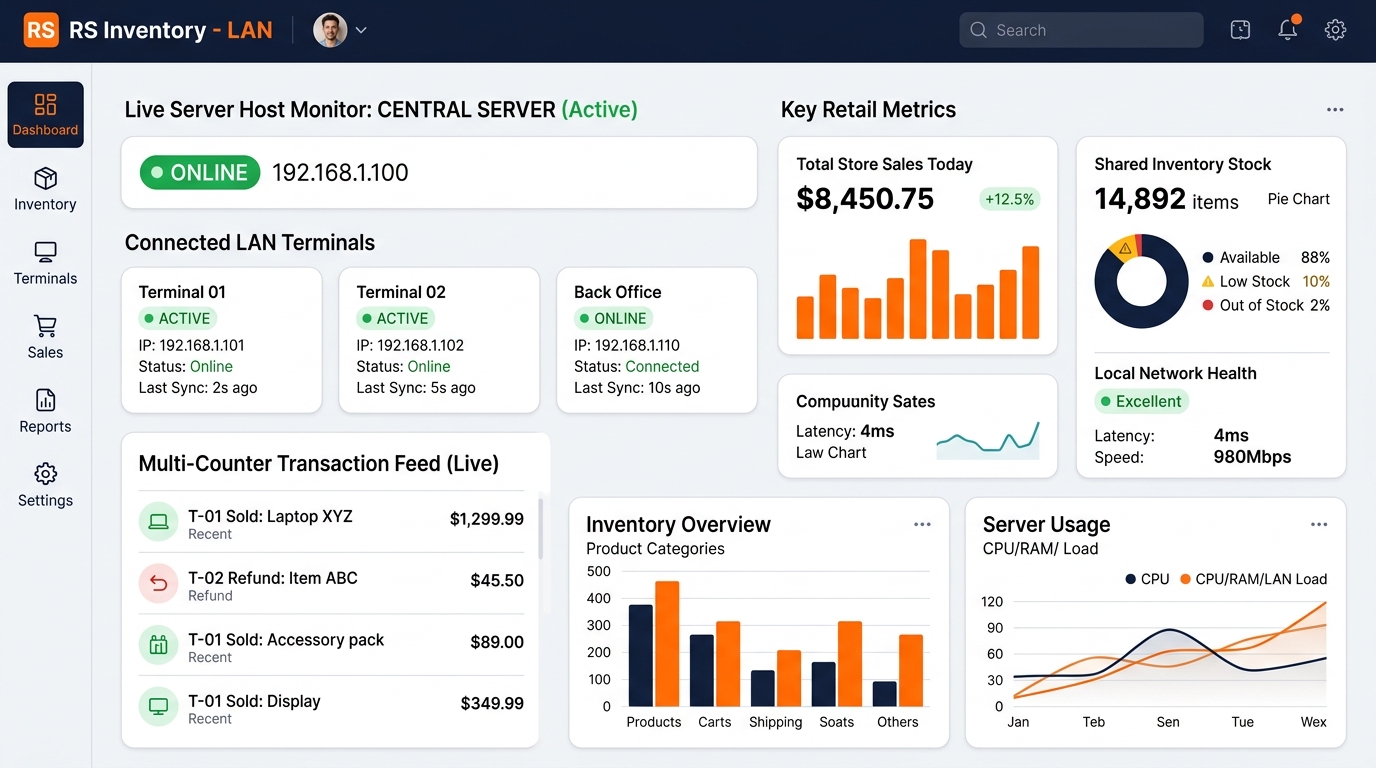
Capabilities for Multi-Computer Retailers
RS Inventory – LAN coordinates product records, customer billing, and stock balances across your counters so your staff can operate with unified store intelligence.
Shared Inventory
Connect multiple checkout terminals to a unified central inventory host to maintain consistent stock quantities across the store.
- Centralized product master accessible by all counter PCs
- Shared live stock visibility preventing accidental overselling
- Cross-terminal product search and price verification
- Consistent stock deduction upon invoice generation
Multi-Computer Billing
Operate multiple checkout points simultaneously to process high footfall without creating long bottlenecks at a single register.
- Create sales invoices from multiple authorized computers
- Counter-specific invoice prefixes for clear shift auditing
- Instant transaction transmission to central store host
- Individual cash drawer tracking per cashier station
Product & Stock Management
Manage your full retail catalog centrally while keeping cashiers informed with current pricing and low-stock indicators.
- Central product registration, barcode mapping, and category setup
- Log inward purchase shipments from the back office terminal
- Record stock returns, transfers, and damaged goods
- Store-wide low-stock thresholds with proactive replenishment alerts
Customer Management
Recognize customers regardless of which billing counter they step up to with unified patron contact records.
- Customer profile registration accessible by any checkout counter
- View customer purchase frequency and historical store bills
- Maintain optional customer GSTIN numbers for B2B billing
- Unified customer reward point ledgers across all terminals
Centralized Reports
Monitor aggregated store revenue or drill down into individual counter performance from the central management screen.
- Consolidated sales reports combining all terminal receipts
- Individual terminal and cashier shift reconciliation
- Overall inventory valuation and movement audit records
- Payment tender breakdowns (Cash, UPI, Card) per counter
User Roles & Permissions
Safeguard store margins and sensitive operations with tiered permissions for cashiers, managers, and administrators.
- Role-based login profiles (Administrator, Manager, Cashier)
- Restrict price overrides and manual discount modifications
- Manager approval required for bill cancellations or refunds
- Audit log tracking which staff member generated each bill
Promotions & Customer Loyalty
Run store-wide campaigns and allow shoppers to redeem points seamlessly at any active checkout counter.
- Configurable promotional coupon codes and validity dates
- Coupon redemption applied uniformly across any connected counter
- Shared customer wallet points with live debit upon redemption
- Loyalty transaction history consolidated on the central host
Communication Settings
Configure email, SMS, or WhatsApp delivery credentials to send digital invoices directly from your central host.
- Central SMTP configuration for automated e-invoice delivery
- Support for customer SMS gateway notification integrations
- Configurable WhatsApp Business messaging provider setup
- Single communication setup managed centrally on host PC
How RS Inventory – LAN Works
RS Inventory – LAN links your counter terminals to a primary host computer over your local store network. Here is a conceptual view of the architecture.
CENTRAL HOST SERVER (192.168.1.100)
Hosts master product database, centralized stock ledger, and consolidated transaction records. Runs automated database backups.
Terminal 01: Counter A
Cashier Checkout Counter
IP: 192.168.1.101Terminal 02: Counter B
Express Billing Counter
IP: 192.168.1.102Terminal 03: Back Office
Store Manager / Inward Stock
IP: 192.168.1.110Experience RS Inventory – LAN
Test how counter terminals and the central host coordinate sales and inventory in the simulated multi-terminal sandbox below.
Terminal 01 • Main Checkout Register
Cashier: Amit S. • IP: 192.168.1.101 • Connected to Central Server
Counter 1 Active Bill
Prefix: INV-C1-849Terminal 02 • Express Billing Register
Cashier: Priya V. • IP: 192.168.1.102 • Connected to Central Server
Counter 2 Active Bill
Prefix: INV-C2-412Store Host Console • Consolidated Store Real-Time Feed
Central Server (192.168.1.100) aggregating live transactions from all counter terminals.
Terminal 01 (Main Counter)
ONLINETerminal 02 (Express Counter)
ONLINEConsolidated Store Total
BALANCEDLive Multi-Counter Transaction Feed
Store-Wide Promotional Coupon Engine & Central Loyalty Wallet
Coupons and customer points are centralized on the Store Server (192.168.1.100). Any discount applied or points redeemed at any counter is synchronized immediately across all terminals.
Active Network Promotional Coupons ALL COUNTERS SYNCED
Central Customer Loyalty Wallet Registry (Real-Time Synced) Host 192.168.1.100
| Customer Name | Mobile Number | Loyalty Tier | Available Points Balance | Wallet Value (₹) | Last Terminal Activity |
|---|
CITY RETAILERS (LAN SUITE)
Designed for Connected Retail Operations
RS Inventory – LAN brings structured, reliable coordination across your checkout stations and stockroom without complicated multi-software setups.
Access to Shared Inventory Information
Any counter clerk can instantly verify available stock numbers and item locations without walking over to other registers or the backroom.
Organized Multi-Terminal Billing Workflow
Process customers simultaneously during peak hours with separate counter invoice numbering and dedicated cash drawer accountability.
Centralized Product Records
Update product selling prices, MRP, or new SKU arrivals once on the host PC and have them instantly reflected on all counter registers.
Easier Coordination Between Staff
Store cashiers focus on customer checkout while managers log supplier shipments and manage promotions from the office computer.
Improved Visibility into Sales Activity
Consolidated reports combine figures from all registers, providing clear end-of-day revenue reconciliation and shift audits.
Reduced Manual Reconciliation
Eliminate manual paper slips and end-of-day tallying between separate single-PC registers with unified local data storage.
Who Is RS Inventory – LAN Designed For?
RS Inventory – LAN is suited for retail businesses where a single checkout counter creates customer queues or where separate office and billing PCs are needed.
Multi-Counter Supermarkets
Grocery marts with two or more billing desks sharing the same fast-moving stock catalog and barcode scanning workflow.
Apparel & Footwear Showrooms
Clothing boutiques with separate floor billing and manager stockroom verification terminals.
Electronics & Gadget Retailers
Mobile and accessories stores managing checkout counters along with customer service and warranty desks.
Hardware, Paint & Sanitary Stores
Shops with counter billing at the front desk and warehouse/godown stock issue verification terminals.
Departmental & General Stores
Multi-section retail outlets requiring synchronized product pricing and coordinated cashier operations.
Wholesale & Retail Mixed Counters
Businesses operating separate consumer checkout and wholesale invoice processing counters under one roof.
Check Your LAN Setup
Ensure your store environment meets the recommended network and computer specifications for dependable multi-terminal performance.
Central Host PC Specs
- Dedicated PC or local server (Windows 10/11 or Linux host)
- 8 GB RAM or higher recommended for host machine
- Fast SSD storage for database logging and automated daily backups
- Static IP assignment within your local subnet
Counter Billing Terminals
- Standard desktop PCs, all-in-one POS units, or counter laptops
- Compatible with standard USB / Bluetooth barcode scanners
- Compatible with 2-inch and 3-inch thermal POS receipt printers
- Chrome / modern browser or dedicated client interface
Local Network Configuration
- Gigabit Ethernet switch (recommended) or reliable store Wi-Fi router
- Low latency (< 10ms) communication across terminals
- Isolated store subnet to prevent interference from guest Wi-Fi
- External internet optional for counter billing; required for cloud backups
Download RS Inventory – LAN (Windows .exe Trial Version)
Install RS Inventory – LAN locally across your store checkout counters. Includes multi-terminal local network sync engine.
RS-Inventory-LAN-Trial-Setup.exe
⚡ Version 1.0.0
🖥️ Windows 10 / 11 (64-bit)
Operating a Single Billing Counter?
If your store only requires inventory tracking and billing on a single computer, explore RS Inventory – Solo. It provides complete product management and POS invoicing without local network setup prerequisites.
Request a LAN Product Demo
Tell us about your store layout, number of checkout counters, and network setup. Our engineering team will review your requirements and coordinate a demonstration.
Frequently Asked Questions
Answers to common questions regarding multi-computer deployment, network prerequisites, and data synchronization.